This is an old revision of the document!
Measuring Visually Evoked Potentials with the Raspberry Pi
Quick Summary
- Status: 🟡 In Progress
- Duration: Attempt 1) February-April 2025 (failed); Attempt 2) August 2025 (success!)
- Type: Hardware/Possible Product
- Team: Fabricio
What we're exploring: Whether we can reliable measure VEPs on the Raspberry Pi. A Checkerboard stimulus is created using a low-level implementation that synchronizes with the Pi-EEG Shield measurements.
Environment & Setup
** Hardware Used **:
- Raspberry Pi 4 B
- OS: Raspbian without Desktop
- Access via SSH in WIFI, directly providing credentials when writing the Image onto the SD card
- video goggles (Bigeyes H3). 57 Degrees field of view.
** Software Used **:
- Visual Stimuli with C + Cmake, using libDRM
- Initial attempt on EEG Recording were with C. Second Attempt relied on rust, with more optimized code using an interrupt listener for the GPIO events.
- The Setup is done via ansible playbooks, which are available in the repo.
- Reference Python Code used is from the EEGwithRaspberryPI Repo
- Code available under: https://code.rekonas.com/fabricio/vep_rpi
Key Findings
What Worked
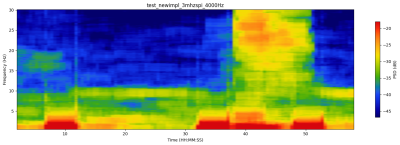
- Eyes Open / Closed + Chewing worked fine.
- The Checkerboard pattern using the libdrm worked well. Synchronization via the screen refreshment rate is possible.
- Setting a high priority to the process in combination with a preemptible Kernel setting (i.e. Desktop mode- NOT server mode) works well in terms of latency, although it is not a full substitute for the realtime kernel.
- Using the Video-Display-Glasses with the rPi was no issue at all and worked well, even though the display was a bit small. No software changes were required, as it was simply treated as another display.
- The low-level graphics interface worked well, but it can get quite complicated very quickly. There is a need to write ahead into the buffer to avoid tearing.
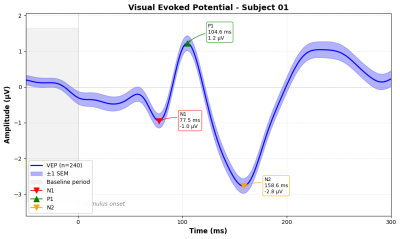
- VEP Measurements
 }}
}}


What Didn't Work
Realtime Linux:
I tried setting up RaspberryPi with the newly provided realtime option for newer linux kernels.
The option for the realtime kernel has to be provided during compile time, and the raspberry pi kernel is not identical to the vanilla linux kernel, so I think that due to this it does (at the current time) not directly support simply setting the RT flag. There is no separate branch that supports realtime linux for the raspberry pi. Theoretically, realtime patches for the raspberry pi should work, but I didn't get it to work, without figuring out the issue.
** Directly using the C code from the PiEEG Shield** The C code is outdated, and there is essentially no explanation. It was necessary to look at the python code and translate it to C.
Surprises & Insights
- Moving to rust did help for a more reliable implementation and easier testing and building.
- There are a LOT of different ways for low-level interaction with the display. The “displaybuffer” is ancient and should NOT be used. The newer kernel mode setting is absolutely overkill and hard to work with. Libdrm seemed like a nice middleground.
A few initial key insights about the PiEEG Code:
- The PiEEG code is not very helpful, and continuation of the project requires understanding of the underlying ADS1299 chip.
- The code uses the BOARD numbering mode for the GPIO pins.
- Pin 37 is used as the “DRDY” (data ready) pin.
- A lot of settings are set to the ADS1299, but in an intransparent way via encoding the bit flags via hex codes.
Quite a few things may be set via the ads1299 registers:
- The sampling rate is set in `config1` and defaults to `250` but can be changed. By default config1 is set to `0x96`, which translates to the binary number `10010110`. The last 3 digits denote the sampling rate. You can find the encoding in Table 13 here
Recommendations
Should we proceed?: Yes
If yes, what needs to happen?
- A reimplementation either in rust, or by someone with a better understanding of C.
- More fine grained practical tests to rule out error sources.
External Ressources
- The PiEEG shield is based on the ads1299 chip, and its manual is probably the best reference: https://www.ti.com/document-viewer/ads1299/datasheet
- Code for PiEEG can be found here, but it is mostly undocumented and barely working out of the box. Key to understanding the code is linking the set registers of the code to its functionalities according to the ads1299 manual.
Papers
Images


